
In our previous post, we introduced an approach for building and managing IoT applications, where applications are packaged as Compose Apps, managed via FoundriesFactory, and operated on-device using composectl and fioup.
In this post, we apply the same approach to Arduino® Apps on UNO Q devices.
Why Convert Arduino Apps to Compose Apps?
Arduino Apps provide a convenient development model for building multi-component applications on devices like the UNO Q. However, their default execution model is primarily local and relies on runtime setup (e.g. dependency installation and environment preparation on first run).
More generally, the Arduino tooling does not provide a built-in mechanism for packaging, distributing, and updating applications across multiple devices. Managing application versions or rolling out updates to a fleet requires additional IoT fleet management infrastructure outside of the Arduino ecosystem.
Converting an Arduino App into a Compose App makes this implicit runtime behavior explicit and reproducible. The application becomes a self-contained artifact that can be versioned, distributed, and executed consistently across devices - the same pattern we use for Docker containers on IoT and Edge devices more broadly.
This provides several benefits:
- reproducible deployments — the same application artifact runs identically on all devices
- no runtime dependency resolution — all dependencies are packaged into container images
- OTA updates — applications can be updated remotely using
fioup - integration with FoundriesFactory — applications can be managed, versioned, and rolled out in a controlled manner
In short, this bridges the gap between local Arduino App development and production-grade deployment and lifecycle management.
Compose Apps, composectl, fioup, and FoundriesFactory each play a distinct role in the App lifecycle:
- Compose Apps define the application and its services,
composectlpackages and runs Compose Apps on the device,fioupdiscovers and applies OTA updates on-device,- FoundriesFactory orchestrates application delivery and fleet management.
The following diagram summarizes the end-to-end flow:
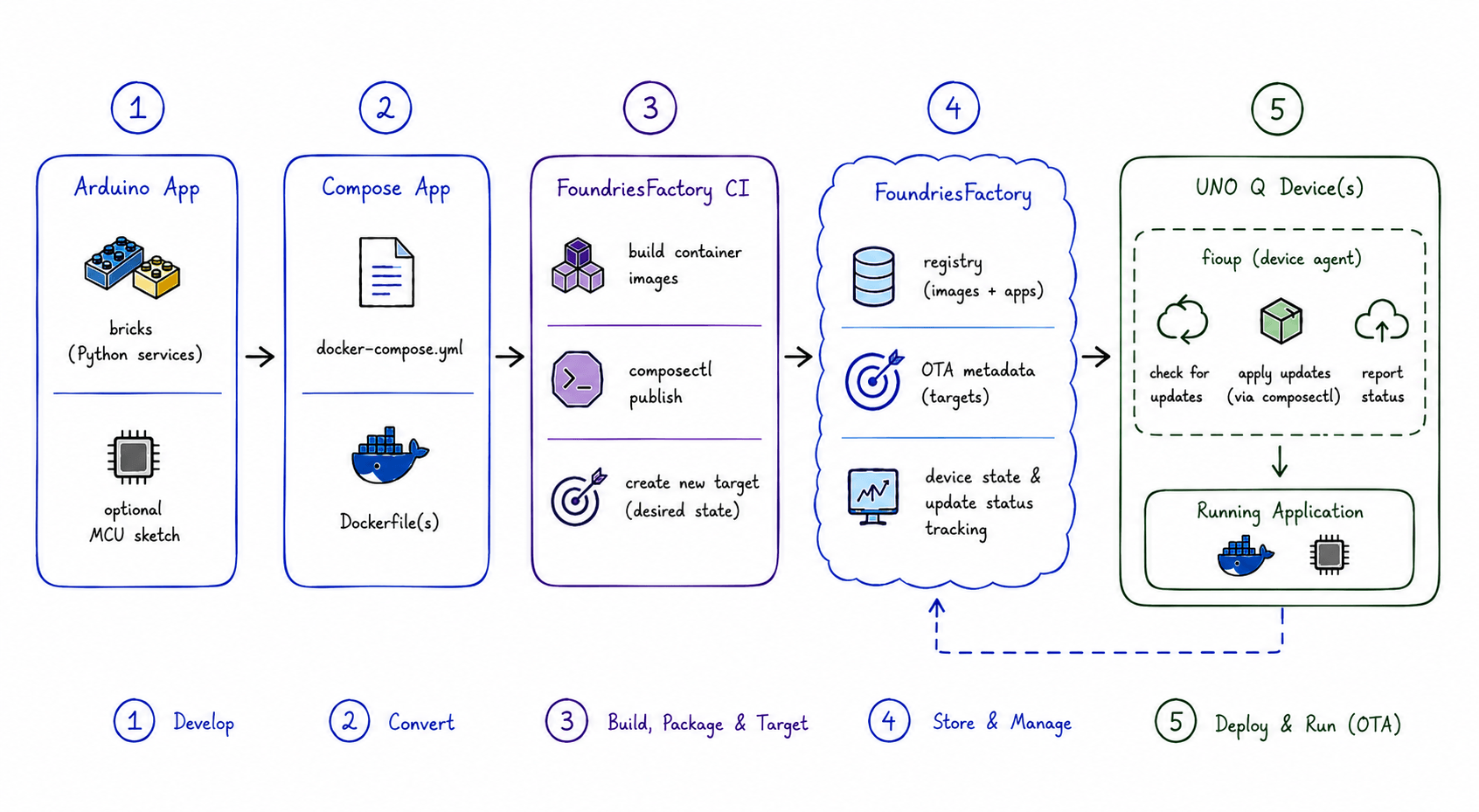
Figure: End-to-end flow from Arduino App to OTA deployment on UNO Q devices.
In this post, we apply the same approach to Arduino Apps. We start by looking at how Arduino Apps are structured, and then walk through a concrete example of converting an existing Arduino App into a Compose App, so that it can be deployed and managed via FoundriesFactory and its on-device tools.
What Is an Arduino App?
An Arduino App is defined as:
“An Arduino App is a modular software architecture that orchestrates multiple components into a single functional unit. Unlike a traditional Arduino sketch, the core of an App is high-level Python logic running on the board's Linux subsystem.” — Arduino documentation
In practice, an Arduino App consists of multiple components running on dual-processor Arduino boards like the UNO Q, distributed between the Linux® subsystem and the microcontroller. This enables more complex applications, with Python running on the Linux subsystem while the microcontroller handles I/O and real-time interaction.
An Arduino App consists of:
- bricks — modular, reusable components that provide specific functionality (e.g. Python services, AI/ML inference tasks, etc.), typically running as Docker containers on the Linux subsystem (MPU),
- an optional C/C++ sketch running on MCU.
Arduino Apps are developed and managed using Arduino tooling:
- arduino-app-cli — a CLI utility for building, running, and managing Apps on the device,
- Arduino App Lab — an IDE for developing, testing, and interacting with Apps.
From a filesystem perspective, an Arduino App is a directory containing its configuration and source code. For example:
tree -L 2 /var/lib/arduino-app-cli/examples/video-generic-object-detection
/var/lib/arduino-app-cli/examples/video-generic-object-detection
├── app.yaml
├── assets
│   └── ...
├── python
│   └── main.py
└── README.md
The python/main.py file serves as the entry point for the application logic running on the Linux subsystem.
The app.yaml file defines the application metadata and the bricks it uses:
name: Detect Objects on Camera
icon: 📽️
description: This example showcases object detection within a live feed from a USB camera.

bricks:
  - arduino:video_object_detection
  - arduino:web_ui
In practice, an Arduino App is implemented as a Compose-based application. When an App is started (e.g. via arduino-app-cli app start or from App Lab), the tooling performs the following steps on the first run:
- compiles the C/C++ sketch (if present),
- creates a Python virtual environment for the main application and installs all dependencies,
- generates a Compose project (a set of
compose.ymlfiles) describing the application, - starts the application using
docker compose up -d.
On subsequent runs, if the application has not changed, it reuses the generated Compose project and simply invokes docker compose up. The App’s bricks are translated into Compose services, each running in its own container. After the first run, the artifacts produced in steps 1–3 are stored in the .cache subdirectory of the App folder:
tree -a -L 2 /var/lib/arduino-app-cli/examples/video-generic-object-detection
/var/lib/arduino-app-cli/examples/video-generic-object-detection
├── app.yaml
├── assets
|   ...
├── .cache
│   ├── app-compose-overrides.yaml
│   ├── app-compose.yaml
│   ├── uv
│   └── .venv
├── python
│   └── main.py
└── README.md
How to Convert an Arduino App into a Compose App
As discussed in the previous section, an Arduino App is translated into a Compose-based application on its first run. In other words, it effectively becomes a Compose App at runtime. This makes it relatively straightforward to convert an Arduino App into a self-contained Compose App.
In the following, we demonstrate this process using the video-generic-object-detection example. The source code of this example App is available both in the Arduino repository at: https://github.com/arduino/app-bricks-examples/tree/0.8.1/examples/video-generic-object-detection
and on a UNO Q device under:
/var/lib/arduino-app-cli/examples/video-generic-object-detection
A complete converted Compose App example is also available in the arduino-apps/video-generic-object-detection branch of the foundriesio/containers repository: https://github.com/foundriesio/containers/tree/arduino-apps/video-generic-object-detection
The commits in this branch intentionally represent the individual steps of the conversion process described in this section.
The conversion process consists of the following steps:
- prepare the App source tree,
- containerize the main Python application,
- define the Compose App services.
Prepare the App Source Tree
The first step is to create a Compose App project structure and copy the Arduino App source code into the app/ directory:
mkdir video-obj-detect && cd video-obj-detect
cp -r /var/lib/arduino-app-cli/examples/video-generic-object-detection app
Alternatively, the app source code can be copied directly from https://github.com/arduino/app-bricks-examples/tree/0.8.1/examples/video-generic-object-detection.
As a result, the project directory should look like:
tree -a -L 2
.
└── app
    ├── app.yaml
    ├── assets
    ├── python
    └── README.md
If the video-generic-object-detection App has been started at least once, it will contain a .cache directory. Remove it from the app directory, or copy the App directly from the GitHub repository.
See the corresponding commit containing the complete project state after this step: https://github.com/foundriesio/containers/tree/b61f22ef0817db8b71cef0040a79e2f7d68ff30a/app.
Create a Container Image for the Main Application
The next step is to create a Dockerfile that builds a container image with a Python virtual environment and all application dependencies pre-installed.
As described earlier, arduino-app-cli creates the virtual environment and installs dependencies on the first run of the App. This approach is not suitable for a Compose App, which should be self-contained and able to start on a device without fetching dependencies from the Internet.
Packaging a self-contained Compose App also ensures integrity and consistency: the exact same artifact that is built and packaged is what gets distributed to and executed on devices.
The complete Dockerfile is available in the example repository: https://github.com/foundriesio/containers/blob/arduino-apps/video-generic-object-detection/Dockerfile
The Dockerfile assumes the presence of an install.sh script in addition to the application source code. This script can be derived from the base image’s run.sh script: https://github.com/arduino/app-bricks-py/blob/release/0.9.0/containers/python-apps-base/run.sh
Specifically, install.sh should contain only the setup logic (e.g. creating the virtual environment and installing dependencies), with the execution logic removed.
In practice, this means removing the final if block (lines 122–132) that starts the application: https://github.com/foundriesio/containers/blob/arduino-apps/video-generic-object-detection/install.sh.
As a result, the project directory should now look like:
tree -a -L 2
.
├── app
│   ├── app.yaml
│   ├── assets
│   ├── python
│   └── README.md
├── Dockerfile
└── install.sh
See the corresponding commit containing the complete project state: https://github.com/foundriesio/containers/tree/77a364c8d1dd2350f8b8fc0d4ba8862d86c95927.
Create the Compose App Definition
At this point, we have a Dockerfile that builds a container image for the main brick of the App—the container responsible for running the Python application.
Since the App consists of two bricks, we also need a second container for the video_object_detection brick. This container is already provided by Arduino and available in their public ghcr.io registry.
In this case, the following "Edge Impulse runner" image is used: ghcr.io/arduino/app-bricks/ei-models-runner:0.9.0.
The next step is to define the Compose App in docker-compose.yml.
Because the App contains two bricks, the Compose file defines two corresponding services:
ei-video-obj-detection-runner— the service responsible for running object detection,main— the service running the Python application logic.
The definition of the ei-video-obj-detection-runner service can be reused directly from the brick’s Compose definition: https://github.com/arduino/app-bricks-py/blob/release/0.9.0/src/arduino/app_bricks/video_objectdetection/brick_compose.yaml
The main service definition is generated dynamically by arduino-app-cli. See: https://github.com/arduino/arduino-app-cli/blob/f3283b94c5a6b9cc8d01f83a5b2822f7a1eabe61/internal/orchestrator/provision.go#L214
The complete docker-compose.yml file is available in the example repository: https://github.com/foundriesio/containers/blob/arduino-apps/video-generic-object-detection/docker-compose.yml
Also, we need to add a .composeappignores file to control which files are included in the final Compose App bundle produced by the composectl publish command invoked by FoundriesFactory CI. In this example, only docker-compose.yml is included in the bundle, since the application source code and dependencies are already packaged inside the container images.
As a result, the project directory should now look like:
tree -a -L 2
.
├── app
│   ├── app.yaml
│   ├── assets
│   ├── python
│   └── README.md
├── Dockerfile
├── install.sh
├── .composeappignores
└── docker-compose.yml
See the corresponding commit containing the complete project state after this step: https://github.com/foundriesio/containers/tree/d29b17e917df0fadd55900ca959fd5a361438934.
Result
At this point, the Arduino App has been fully converted into a self-contained Compose App.
The final result corresponds to the latest commit in the arduino-apps/video-generic-object-detection branch of the foundriesio/containers repository: https://github.com/foundriesio/containers/tree/arduino-apps/video-generic-object-detection.
Managing Arduino Apps on UNO Q with FoundriesFactory
Once the Arduino App has been converted into a Compose App, it can be remotely managed and updated on UNO Q devices using FoundriesFactory and fioup.
This section assumes that:
- FoundriesFactory has already been created,
fioupis installed on the target UNO Q devices,- and the devices are registered with the factory.
The next step is to add the converted App project to the factory’s containers.git repository: https://docs.foundries.io/96/user-guide/containers-and-docker/containers.html
In practice, this means copying the project directory created in the previous section into the repository, committing the changes, and pushing them to the factory. The example app repository can be added directly as a Git submodule.
The project directory name (video-obj-detect) becomes the Compose App name in FoundriesFactory. It should also match the container image name referenced by the main service in docker-compose.yml.
cd <path-to-factory-containers.git>
git submodule add -b arduino-apps/video-generic-object-detection https://github.com/foundriesio/containers video-obj-detect
git add video-obj-detect && git commit -m "Add Detect Objects on Camera Compose App" && git push
Once pushed, FoundriesFactory automatically:
- builds container images of the Compose App,
- packages the Compose App using
composectl, - publishes the Compose App and its images to a registry,
- creates a new target referencing the published App, making it available as an over-the-air software update to every registered device.
After the target becomes available, devices can discover and apply the update using fioup:
fioup check
fioup update
Alternatively, fioup can run as a daemon and automatically apply updates as they become available. See this guide for details on enabling the fioup systemd service.
From this point onward, the converted Arduino App behaves like any other Compose App managed by FoundriesFactory.
Conclusion
By converting Arduino Apps into Compose Apps, we enable them to be:
- packaged reproducibly
- distributed via registries
- deployed via OTA
- managed consistently across devices
This bridges Arduino's application model with a production-grade workflow for managing OTA updates across a fleet of embedded devices.
In the next blog post, we will demonstrate how to reliably and efficiently OTA update AI/ML models using this approach: Arduino Apps converted into Compose Apps and managed through FoundriesFactory.